How to Unlock AC Remote: Complete Step-by-Step Guide for All AC Brands

Have you ever picked up your AC remote, pressed the buttons, and nothing happened? You try increasing the temperature. Nothing. You press the power button. Still nothing.
Then you notice a tiny lock symbol on the screen and suddenly realize your AC remote has locked itself.Don’t worry. This is one of the most common AC remote problems, and in most cases, it takes less than a minute to fix.
In this complete guide, you’ll learn exactly how to unlock AC remote controls for different brands, why remotes get locked, what the lock symbol means, and what to do if the remote still doesn’t work after unlocking.
How to Unlock AC Remote?
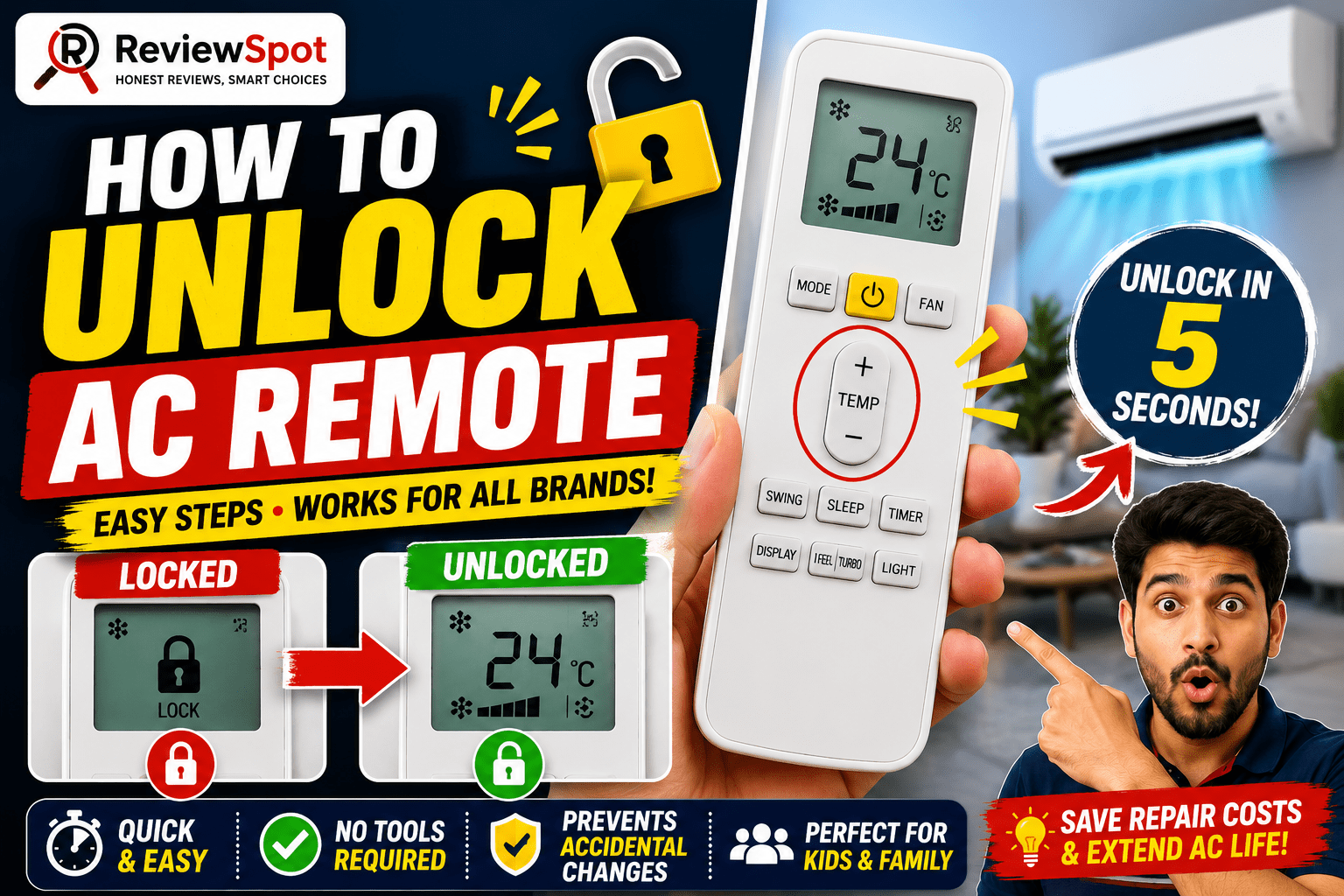
The fastest way to unlock an AC remote is:
- Press and hold the Temperature “+” and “-” buttons together for 3 to 5 seconds.
- Wait until the lock symbol disappears.
- Test the buttons again.
If that doesn’t work:
- Press Mode + Temperature Down together for 5 seconds.
- Remove the batteries for 2 to 5 minutes and reinsert them.
- Press the reset button if your remote has one.
What Does the Lock Symbol Mean on an AC Remote?
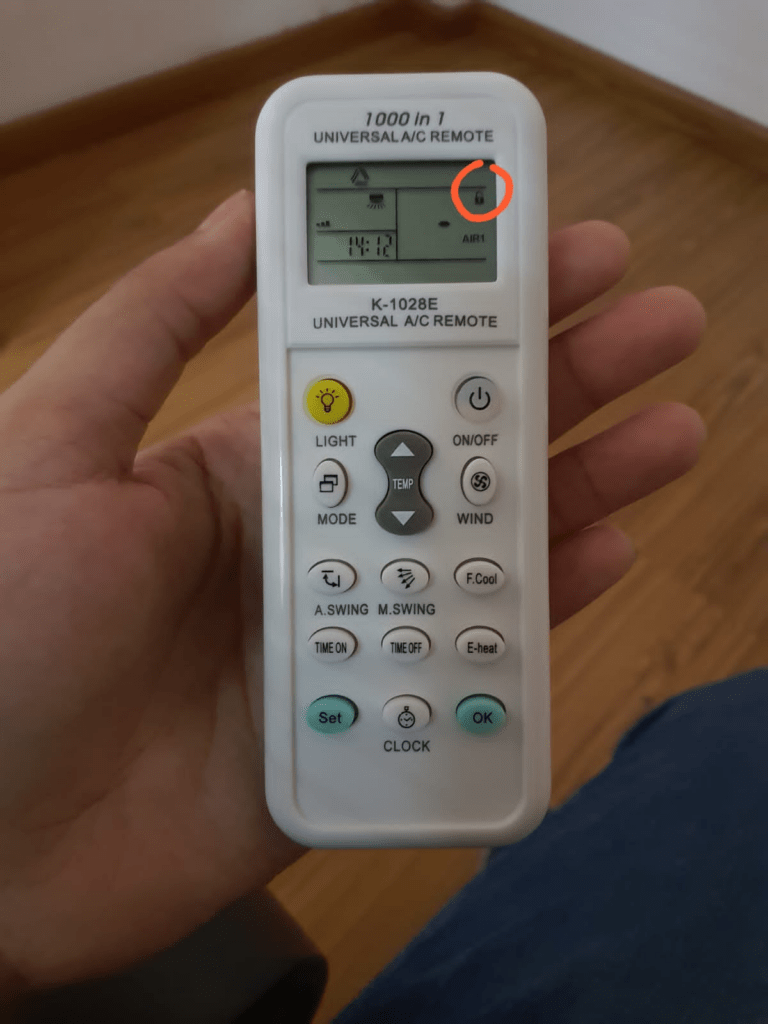
The lock icon means the child lock feature has been activated. Manufacturers include this feature to prevent accidental changes to:
- Temperature settings
- Fan speed
- Cooling modes
- Timer settings
It’s especially useful if:
- Children play with the remote
- The remote is kept on a sofa or bed
- Multiple people use the same AC
Once activated, most buttons stop responding until the remote is unlocked.
Read: 10 Best Air Conditioner For Apartment in India 2026
Why Does an AC Remote Get Locked?
Many people think the remote is broken when it gets locked. Usually, that’s not the case. Common reasons include:
- Accidental Button Presses: Sometimes the remote gets stuck between cushions or inside a blanket. A few random button presses can activate the child lock mode.
- Children Playing With the Remote: Kids somehow discover hidden settings faster than adults. One minute they’re changing channels on the TV. The next minute your AC is locked.
- Long Pressing Multiple Buttons: Many remotes activate the lock function when two buttons are pressed together for several seconds. This can happen accidentally.
- Software Glitches: Occasionally, weak batteries or minor software issues may trigger strange behavior. A simple reset often fixes the problem.
How to Unlock AC Remote Using the Universal Method
This method works on most AC brands.
Method 1: Press Temperature Plus and Minus Together
Steps:
- Hold the “+” button.
- Hold the “-” button simultaneously.
- Keep both pressed for 3 to 5 seconds.
- Wait for the lock icon to disappear.
Method 2: Press Mode and Temperature Down
Some models use a different combination.
Steps:
- Press Mode.
- Press Temperature Down (-).
- Hold both for 5 seconds.
- Check if the lock icon disappears.
This method works on several older AC models.
How to Unlock AC Remote of different Brands
1. How to Unlock Voltas AC Remote
Voltas remotes commonly use the child lock feature.
Method 1
- Press Temp “+” and Temp “-” together.
- Hold for 3 to 5 seconds.
- Wait for the lock symbol to disappear.
Method 2
- Press Mode and Temp Down together.
- Hold for 5 seconds.
Method 3
- Remove batteries for several minutes.
- Reinsert fresh batteries.
- Test the remote.
These methods work for most Voltas inverter and non-inverter models
2. How to Unlock LG AC Remote
LG remotes are usually simple to unlock.
Steps:
- Hold Temp Up and Temp Down together.
- Continue pressing for 3 to 5 seconds.
- Wait until the lock icon disappears.
After unlocking:
- Press Power.
- Adjust temperature.
- Confirm all buttons work normally.
3. How to Unlock Daikin AC Remote
For many Daikin remotes:
- Press Mode + Temp Up.
- Or press Temp Up and Temp Down together.
- Hold for several seconds.
The lock icon should disappear automatically.
4. How to Unlock Hitachi AC Remote
Hitachi remotes often use:
- Temperature Plus (+)
- Temperature Minus (-)
Hold both buttons simultaneously for a few seconds.
The child lock should turn off immediately.
5. How to Unlock Panasonic AC Remote
Panasonic models may vary.
Try:
- Temp + and Temp –
- Mode + Temp Down
- Reset button
If none work, consult the user manual.
Different Panasonic series use different key combinations.
6. How to Unlock Blue Star AC Remote
Blue Star remotes may use:
- Temperature buttons together
- Lock button
- Reset pinhole
Some newer models have dedicated reset functions.
7. How to Unlock Godrej AC Remote
For most Godrej AC remotes:
- Hold Temp Up and Temp Down together.
- Wait 5 seconds.
- Check if the lock symbol disappears.
If not:
- Remove batteries.
- Reset the remote.
8. How to Unlock Whirlpool AC Remote
Try:
- “+” and “-” together
- Mode + Temp Down
- Battery reset
Most Whirlpool remotes follow standard child lock methods.
Understanding Common AC Remote Symbols
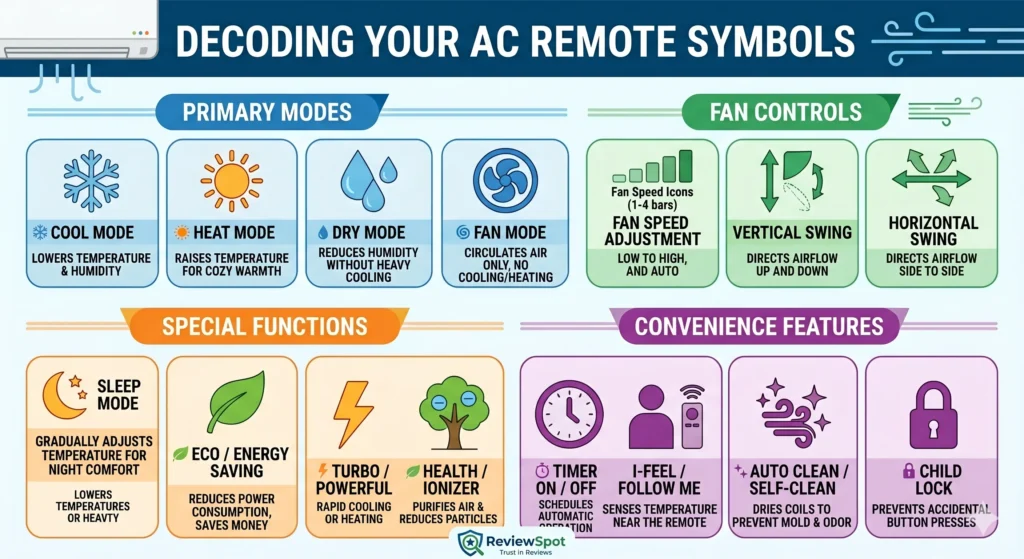
- Lock Symbol: Indicates child lock mode.
- Snowflake Symbol: Cooling mode.
- Fan Symbol: Fan-only operation.
- Water Drop Symbol: Dry mode.
- Sun Symbol: Heating mode on hot and cold ACs.
- Clock Symbol: Timer settings.
Understanding these symbols prevents accidental activation of unwanted features.
Read: Best AC Cleaning Kit in India 2026
What If Your AC Remote Doesn’t Unlock?
Sometimes the lock icon disappears but the remote still doesn’t work. This usually means another issue exists.
1. Replace the Batteries
Weak batteries cause strange remote behavior. Symptoms include Delayed response, Partial display, Random locking or Weak signal transmission. Install fresh batteries and test again.
2. Clean the Remote Sensor
Dust can block infrared signals. Use Dry microfiber cloth or Cotton swab. Clean Front sensor and Battery contacts. Avoid using water.
3. Check the AC Sensor
The problem may not be the remote. Inspect the indoor unit sensor. Make sure Nothing blocks it, It isn’t covered with dust.
4. Perform a Full Battery Reset
This trick fixes many stubborn issues. Many users solve lock problems using this method.
Steps:
- Remove batteries.
- Press every button once.
- Wait 5 minutes.
- Insert new batteries.
How to Reset an AC Remote
If unlocking doesn’t work, reset the remote.
Method 1: Battery Reset
- Remove batteries.
- Wait 5 minutes.
- Reinsert batteries.
Method 2: Reset Button
Some remotes include a tiny reset hole. Press gently for a few seconds.
Use:
- Toothpick
- Paper clip
- SIM ejector tool
Method 3: Factory Reset
Some smart AC remotes support factory reset combinations. Check the user manual.
How to Test if Your AC Remote Is Working
Many people replace remotes unnecessarily. Use your smartphone camera.
Steps:
- Open phone camera.
- Point remote toward camera.
- Press any button.
If you see a blinking light on the phone screen Remote is sending signals or Problem may be elsewhere. If no light appears Batteries may be dead or Remote may be faulty.
Common Mistakes People Make
- Pressing Buttons Too Quickly: Hold the buttons long enough. Most remotes require several seconds.
- Using Old Batteries: Weak batteries create confusing symptoms. Always test with new batteries first.
- Ignoring the User Manual: Different models use different unlock combinations. The manual often provides the fastest solution.
- Assuming the Remote Is Broken: Many locked remotes work perfectly after a simple reset.
Can a Universal AC Remote Fix the Problem?
Yes. If your original remote is damaged Purchase a universal AC remote. Pair it with your AC brand. Configure the correct code.
Universal remotes work with brands such as:
- Voltas
- LG
- Daikin
- Blue Star
- Panasonic
- Hitachi
- Godrej
- Whirlpool
Signs Your AC Remote Needs Replacement
Consider replacing the remote if:
- Buttons are physically damaged.
- Display is blank.
- Infrared sensor has failed.
- Battery contacts are corroded.
- Reset attempts fail repeatedly.
Tips to Prevent AC Remote Lock Problems
These simple steps can save a lot of frustration later. Follow these habits:
- Keep the remote in a holder.
- Store away from children.
- Avoid pressing multiple buttons randomly.
- Replace batteries regularly.
- Clean the remote monthly.
- Read the manual for hidden features.
Frequently Asked Questions
Why is my AC remote showing a lock sign?
The child lock feature has been activated. Hold the unlock button combination for several seconds.
How do I unlock an AC remote without the manual?
Start with Temp “+” and “-” together for 5 seconds. This works on many models.
Can low batteries cause remote lock problems?
Yes. Weak batteries can cause display issues and button malfunctions.
What if my AC remote still doesn’t work after unlocking?
Try fresh batteries, sensor cleaning, remote reset, and smartphone camera testing.
Is the lock symbol a fault code?
No. It usually indicates child lock mode, not a hardware failure.
Why is there a lock on my AC remote?
The lock icon means the remote’s child lock/key lock feature is enabled to prevent accidental button presses.
How to remove lock from remote?
Press and hold the + and – temperature buttons together for 3–5 seconds to disable the lock.
How to unlock Voltas AC remote lock?
Hold the Temperature Up (+) and Temperature Down (–) buttons together for a few seconds until the lock icon disappears.
How do I unlock my AC remote button?
Press the designated lock/unlock key combination, usually Temp + and Temp – together for 3–5 seconds.
How do I turn off the AC lock?
Disable the child lock by holding the correct button combination until the lock symbol disappears.
How to remove lock symbol in AC remote?
Press and hold the remote’s lock/unlock button combination for a few seconds.
How to unlock AC mode?
First unlock the remote, then press the Mode button to change cooling modes.
Why is my AC locked?
Your AC isn’t locked; the remote is usually in child lock mode, preventing commands.
How to open remote lock?
Press and hold the remote’s unlock key combination for 3–5 seconds.
How to unlock general AC remote?
Hold the Temperature + and – buttons together or follow your remote’s manual.
How to remove child lock in Voltas?
Press and hold the + and – temperature buttons simultaneously for a few seconds.
How to disable remote lock?
Use the same button combination that enabled the lock, typically Temp + and Temp –.
Why does the AC remote get locked?
It can happen accidentally by pressing certain buttons together or intentionally through the child lock feature.
How to unlock Voltas AC first time
If the remote shows a lock icon, hold Temperature + and – together for 3–5 seconds before using it.
Final Thoughts
Learning how to unlock AC remote controls is much easier than most people think. In many cases, all it takes is pressing two buttons together for a few seconds.
The most effective method is holding the Temperature “+” and “-” buttons simultaneously. If that doesn’t work, try Mode + Temperature Down, perform a battery reset, or use the reset button if available.
Most importantly, don’t panic when you see the lock symbol. It’s usually a safety feature, not a serious problem. With the steps in this guide, you can unlock your AC remote, restore normal operation, and get back to enjoying cool air without calling a technician.
Related Post:
- [9 Reasons] Why is my air conditioner leaking water inside the house?
- How to Choose the Right Air Cooler Based on Room Size
- Air Cooler vs Air Conditioner: Which One Is Better for Your Home in 2026?
- How to Reduce AC Electricity Bill: 27 Practical Tips That Actually Work
Sourabh researches and writes about home appliances, kitchen appliances, and common appliance problems to help readers make informed buying decisions. He covers mixer grinders, refrigerators, air conditioners, washing machines, and appliance troubleshooting.
At ReviewSpot, Sourabh compares manufacturer specifications, product features, warranty information, pricing, and customer feedback to turn technical appliance information into practical buying advice. His goal is to help readers understand their options, avoid costly mistakes, and choose products that fit their needs and budget.
ReviewSpot distinguishes manufacturer information, customer feedback, and editorial analysis, and does not describe products as hands-on tested unless they have actually been tested.